New Video- ADAM-250PN - Full Walkthrough with TIA Portal, Node-RED & MQTT → Watch now


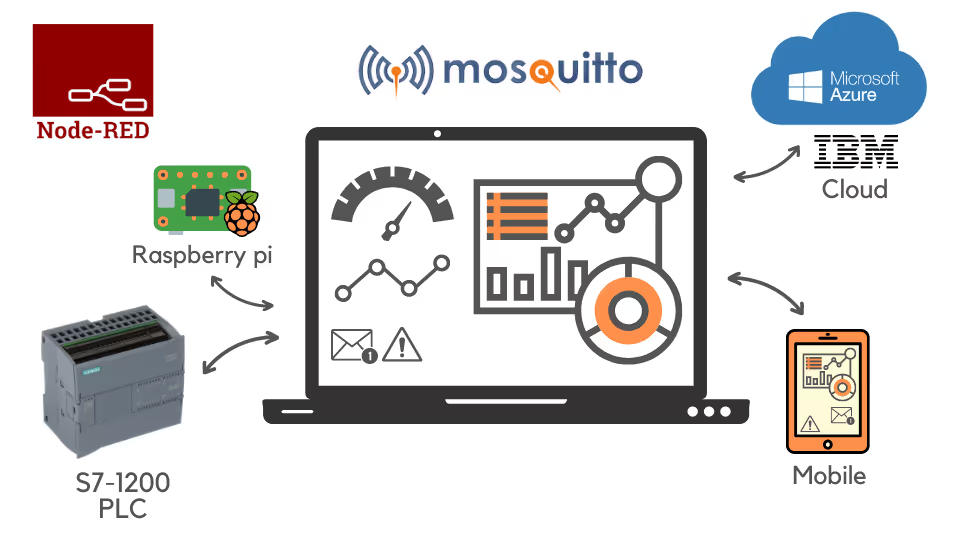
Set up your own MQTT broker in Node-RED or on a Raspberry Pi, publish and subscribe PLC data, control devices from your phone, and connect to cloud brokers including IBM Cloud, Azure and AWS.
“This is the best place to learn about IIOT.”
Learn MQTT through projects that build on each other.
Learn how MQTT brokers and clients share data.
Set up an MQTT broker with Node-RED on your computer or a Raspberry Pi.
Build an MQTT layer in Node-RED for PLCs that do not support MQTT, such as the S7-1200 or a Delta PLC.
Move data from several PLCs to a broker on an edge device.
Publish and subscribe to PLC data from your mobile phone, and control a Shelly WiFi relay.
Connect to cloud brokers and platforms including Mosquitto, IBM Cloud, Azure IoT Hub and AWS IoT.
An introduction to MQTT and sharing data between a broker and clients.
Moving data from one or several PLCs to a broker on your computer or a Raspberry Pi.
Controlling a Shelly WiFi relay, the Mosquitto cloud broker and IBM Cloud.
Interfacing with Azure IoT Hub and AWS IoT, plus a webinar on connecting a Raspberry Pi and S7-1200 through a cloud broker.
See how Rajvir teaches, from MQTT basics to moving PLC data to a broker on a Raspberry Pi.
Learn how brokers and clients share data.
Publish real PLC data for any client to use.
Set up the edge device that hosts your broker.
Download links for the software used in Code and Compile courses are on the Code and Compile Wiki.
“I have learned a lot from the course so far and Rajvir has been excellent instructor!”
“I really like the way your're teaching. All of the courses are beautifully created thus easily understandable.”
“Rajvir is an exceptional teacher who simplifies complex topics effortlessly. He’s always available in comments or even via TeamViewer to help you understand. Truly dedicated and teaches straight from the heart.”
He is a skilled Automation and IIoT Specialist, dedicated to achieving goals with precision. His passion lies in making learning accessible and enjoyable through the use of cutting-edge educational tools.





Take this course on its own, or unlock every Code and Compile course with PRO.
Practice flashcards. Test yourself on automation and IIoT concepts at beginner, medium and advanced levels on cards.codeandcompile.com.
You will be redirected to Code and Compile School for payment.
No. A PLC, Raspberry Pi and Shelly relay are optional. You can practise with PLCSIM or simulated values, and Node-RED and MQTTBox are free.
Yes. Every lesson has a comment section for your questions. If a query cannot be resolved there, Rajvir offers free screen-sharing sessions.
Yes. Use the Teachable app on Android or iOS, sign in with your account and save videos for offline access.
Yes. You receive a unique completion certificate when you finish the course.
You can request a refund within 72 hours of purchase by emailing info@codeandcompile.com.
Learn at your own pace, with an instructor who helps you when you get stuck.
Start the courseMaster Industrial Automation and Industrial Internet of Things